FREQ
Upper left · 10 Hz–10 kHz
Sets the base oscillator frequency with a logarithmic response. The default is about 261.63 Hz (C4). Use OCT for octave steps, or leave it off for continuous tuning.
Leviathan for VCV Rack 2 · Open Source
An 8 HP oscillator with sine, folded morph, linear FM, and a gated sub-octave.
Meet Undertow
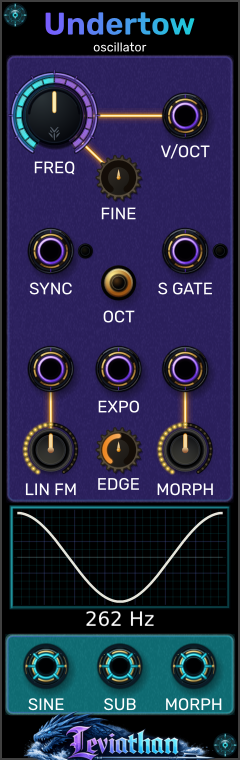
Undertow produces three simultaneous signals from a shared oscillator: SINE, MORPH, and a square-wave SUB one octave below. Use SINE for a rounded fundamental, MORPH for evolving harmonics, and SUB for bass reinforcement. All three outputs support up to 16 voices.
First patch
Panel tour
Click a numbered marker to reach its description. Purple jacks are inputs; cyan jacks are outputs. All three outputs run simultaneously.
Upper left · 10 Hz–10 kHz
Sets the base oscillator frequency with a logarithmic response. The default is about 261.63 Hz (C4). Use OCT for octave steps, or leave it off for continuous tuning.
Below FREQ · −100 to +100 cents
Offsets the base pitch by up to one semitone in either direction. Center is zero. Fine tuning stays active when OCT is enabled.
Gold button below FINE
Switches FREQ between continuous tuning and octave steps referenced to C4. The button lights in stepped mode. V/OCT and EXPO still apply continuous pitch offsets.
Lower left knob · 0–100%
Sets modulation depth for the jack directly above it. Start at zero and increase gradually. The upper 20% adds nonlinear drive to the modulation bus; the input is AC-coupled, so use EXPO for sustained pitch offsets.
Small lower center knob · 0–100%
Controls the hardness of the morph fold boundary. Turn down for a softer transition or up for a sharper edge. Default: 50%.
Lower right knob · 0–100%
Raises and widens a triangular fold from the sine trough. With the jack above it empty, the knob directly sets the morph amount. With CV patched, it sets depth: knob × voltage / 8 V, clamped to 0–100%.
Display below the knobs
Shows the morph waveform and a frequency readout. Watch the fold develop as you turn MORPH and EDGE. The Preview tracer context-menu option toggles the tracer.
Upper right jack
Tracks pitch at one octave per volt, added to FREQ and FINE. Patch a keyboard or sequencer here. Polyphonic pitch supports up to 16 voices.
Left jack below FREQ
A rising trigger resets the main oscillator phase for hard-sync sounds. The small light beside the jack indicates sync activity. Patch another oscillator here and sweep FREQ to explore changing harmonics.
Right jack above MORPH
Gates SUB only. With no cable, SUB runs continuously. With a cable, voltages below 1 V mute SUB; 1 V or higher enables it. A rising gate resets the sub-divider state. The nearby light indicates a patched high gate.
Center jack above EDGE
Adds exponential frequency modulation at one octave per volt, summed with V/OCT. Use an external attenuator for small vibrato or pitch-envelope amounts. Unlike LIN FM, this input passes sustained pitch offsets.
Left jack above the LIN FM knob
Feeds the linear FM bus. The knob below sets depth. DC and very slow changes are rejected by AC coupling around 4.9 Hz. The oscillator stays within 8 Hz–20 kHz rather than crossing through zero frequency.
Right jack above the MORPH knob
Multiplies the MORPH knob setting by voltage / 8 V. At full knob, 0–8 V covers the full morph range; negative values clamp to zero. A cable at 0 V returns the waveform to zero morph, even with the knob raised.
Bottom left cyan jack
Approximately ±5 V sine-like signal at the main oscillator pitch. Analog character adds subtle soft saturation by default; disable it in the context menu for the cleaner underlying wave.
Bottom center cyan jack
Square wave one octave below the main oscillator, limited to ±5 V. Use S GATE to switch this layer rhythmically while SINE and MORPH continue. There is one sub output.
Bottom right cyan jack
Folded waveform at the main oscillator pitch, limited to ±5 V. Its timbre follows MORPH, EDGE, Morph CV, and the Asymmetry setting. This output is simultaneous with SINE and SUB.
Inputs and outputs
| Control / connection | Behavior |
|---|---|
| V/Oct input | Pitch tracking at one octave per volt. Added to coarse and fine tuning. |
| Expo FM input | An additional exponential pitch input at one octave per volt, summed with V/Oct. Use an external attenuator for subtle modulation. |
| Linear FM input | AC-coupled frequency modulation, with DC rejection around 4.9 Hz. The amount knob controls depth. A normalized 10 V signal corresponds to a base-frequency-sized deviation before drive. Frequency stays positive and is limited to 8 Hz–20 kHz. |
| Morph CV input | Effective morph = clamp(knob × voltage / 8 V, 0, 1). At full knob, 0–8 V spans the full morph range. Negative voltages clamp to zero. Inserting a cable replaces the knob-only setting with this multiplication. |
| Sync input | A rising trigger resets the main oscillator phase for hard-sync effects. The adjacent light indicates sync activity. |
| S-Gate input | Controls SUB only. Unpatched: continuous sub. Patched: below 1 V mutes it; at or above 1 V enables it. A rising gate resets the sub divider state. The light indicates a patched high gate. |
| SINE output | Approximately ±5 V sine-like output. Analog character is enabled by default. |
| MORPH output | Folded waveform, limited to ±5 V. Shares the main oscillator pitch with SINE. |
| SUB output | One square-wave output at half the main oscillator frequency (−1 octave), limited to ±5 V. There is no separate −2 octave output. |
Voice count follows the largest channel count on any input, up to 16. All three outputs use that voice count. A monophonic control cable can address all voices through Rack’s normal polyphonic input behavior.
Context menu
| Control / connection | Behavior |
|---|---|
| Coarse Tune → Continuous / Octave Stepped | The same coarse tuning mode controlled by the panel button. |
| Morph → Asymmetry → Off / Rising / Falling | Off is the default. Rising and Falling select which side of the fold receives the asymmetric entry lift. |
| Analog character | Enabled by default. Adds subtle asymmetric soft saturation to SINE and MORPH. Switch off for the cleaner underlying waves. |
| Preview Visual → Preview tracer | Toggles the visual tracer; enabled by default. |
Patch recipes
Send MORPH through a VCA. Patch a 0–8 V envelope to Morph CV and raise Morph to taste. Use edge hardness to choose a smoother or sharper fold.
Patch another oscillator’s sine to Linear FM. Start with the amount at zero, then raise it gradually. Explore the upper fifth of the knob for a more driven modulation response.
Mix SINE and SUB. Send a rhythmic gate to S-Gate so the sub enters only on selected notes while the main oscillator continues. Use a separate VCA envelope to shape the complete voice.
Troubleshooting
Raise the Morph knob. With CV patched, the knob multiplies the incoming voltage; zero knob means zero morph. Use positive CV for the full range.
Remove the S-Gate cable or send a gate at least 1 V high. S-Gate does not gate SINE or MORPH.
Linear FM rejects DC and very slow changes. Use Expo FM or V/Oct for sustained pitch offsets and slow pitch modulation.
Stepping applies only to the coarse Frequency knob. Fine tune and the pitch inputs still add continuous offsets.
Reference
VCV Rack 2 · 8 HP · up to 16 channels · three outputs · GPL-3.0-or-later.
Checked against the local Undertow engine, widget, and shared fold-shape implementation. Frequency knob range: 10 Hz–10 kHz; final oscillator frequency limit: 8 Hz–20 kHz. Panel artwork can differ between releases.